

- What is Snapchat Planets?
- How to Enable Snapchat Planets (Friend Solar System)
- How to See Your Snapchat Planet
- Snapchat Planets Order and Meaning
- Mercury — Closest Friend
- Venus — Second Closest Friend
- Earth — Third Closest Friend
- Mars — Fourth Closest Friend
- Jupiter — Fifth Closest Friend
- Saturn — Sixth Closest Friend
- Uranus — Seventh Closest Friend
- Neptune — Eighth Closest Friend
- What Affects Your Planet Ranking?
- Messaging and Snap Frequency
- Streaks and Recency
- Mutual vs. One-Sided Interaction
- Common Snapchat Planets Misconceptions
- Does Snapchat Plus Show Who Viewed Your Profile?
- Do Planets Update in Real Time?
- Can Someone See Your Planet Ranking?
- How to Customize or Hide Your Snapchat Planets?
- More Snapchat+ Features
- Common Problems with Snapchat Planets (And How to Fix Them)
- Snapchat Planets vs. Old Best Friends List
- Frequently Asked Questions (FAQs)
- 1. What is Snapchat Planets?
- 2. What is the order of Snapchat planets in 2026?
- 3. How do I see my Snapchat Planets?
- 4. How does Snapchat choose my friend’s planet?
- 5. What does Uranus mean on Snapchat?
- 6. Can I change or customize my Snapchat Planets?
- 7. Is Snapchat Planets free?
- 8. Can others see my Snapchat Planets?
- 9. Does Snapchat Plus show who viewed your profile?
- 10. Do voice calls affect your Snapchat Planets ranking?
- 11. Why don’t I see Planets after subscribing?
- Final Thoughts on Snapchat Planets
Snapchat has consistently introduced creative ways to make social interaction fun and personal. One of the latest features that has captured the attention of Snapchat+ subscribers is Snapchat Planets, or the Friend Solar System. This feature is part of the Snapchat+ subscription and adds a colorful, interactive twist to how you visualize your closest friendships. In this guide, we’ll explain everything you need to know about Snapchat Planets — how to enable them, what each one means, why your ranking changes, and the Snapchat planet order.
What is Snapchat Planets?
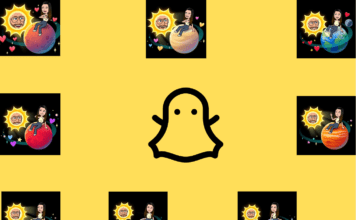
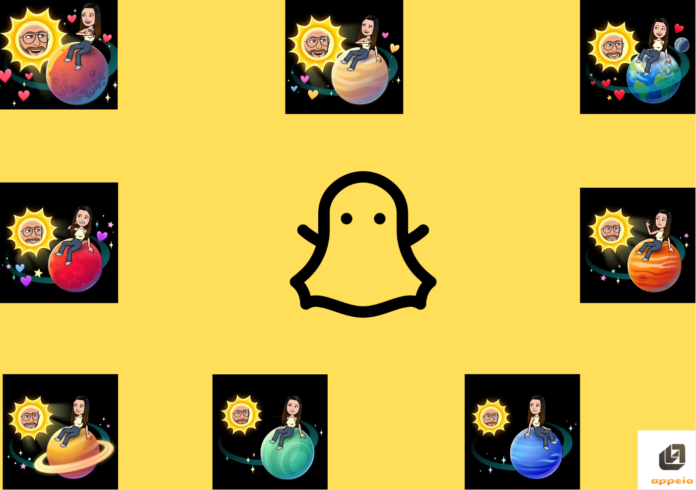
Snapchat Planets is a feature exclusive to Snapchat+, which displays your closest friends as planets orbiting your Bitmoji Sun. The more frequently you interact with someone on Snapchat, the closer they are to your Bitmoji Sun in your Snapchat Solar System. It’s a fun and creative way to show off your best friends, with each planet representing a different person in your life.
Each planet in your Snapchat planet order is assigned based on your interaction levels with your friends. This means Mercury will be your closest friend, while Neptune will represent the friend who is furthest away in terms of interaction. Importantly, a planet isn’t a fixed score — it reflects your ranking of that friend relative to your other top friends, so it can shift even if your own behavior hasn’t changed.
📌 Trivia: The idea takes inspiration from real astronomy — Mercury, the closest planet to the sun, represents your #1 best friend.
How to Enable Snapchat Planets (Friend Solar System)
To use Snapchat Planets, you need to subscribe to Snapchat+. Here’s how you can unlock this feature:
- Open Snapchat and tap on your profile icon in the top-left corner of the screen.
- Subscribe to Snapchat+ if you haven’t already. You’ll find the subscription banner under your profile information.
- Tap on a friend’s Bitmoji to open their Friendship Profile.
- Scroll down to view their Friend Solar System. If you’re among their top friends, you’ll see their planet.
Once you’ve subscribed to Snapchat+, you can start exploring your solar system and those of your closest friends!
Pro Tip:
If you don’t see the feature right away, try updating your app to the latest version from the App Store or Google Play Store.
How to See Your Snapchat Planet
“Enabling” Planets and “seeing” your planet in a friend’s solar system are two different steps — here’s how to check where you rank with a specific friend:
- Open Snapchat and go to your Chat or Friends list.
- Tap on the friend’s name or Bitmoji to open their Friendship Profile.
- Look for the Best Friends badge — a gold-ringed icon next to their name means you’re in their top 8.
- Tap the badge. This reveals which planet you’ve been assigned in their Friend Solar System.
Keep in mind this only works if that friend has Snapchat+ active and has Solar System visibility turned on. You also can’t see your own planet ranking from your own profile — planets only show up on other people’s profiles, reflecting where you rank with them.
Snapchat Planets Order and Meaning
Each friend in your Snapchat Planets system is represented by a different planet, depending on how close you are. Here’s a quick-reference summary, followed by a full breakdown of each planet below.
| Planet | Order | Meaning |
|---|---|---|
| Mercury | 1st | Closest friend |
| Venus | 2nd | Second closest friend |
| Earth | 3rd | Third closest friend |
| Mars | 4th | Fourth closest friend |
| Jupiter | 5th | Fifth closest friend |
| Saturn | 6th | Sixth closest friend |
| Uranus | 7th | Seventh closest friend |
| Neptune | 8th | Eighth closest friend |
Mercury — Closest Friend
Mercury is the little red planet in your Snapchat+ subscription, consisting of five hearts and two stars around it. This badge indicates that this friend is your best buddy among your top 8 — the person you interact with the most. Since Mercury is the first planet in our solar system, it’s been assigned this role.
Venus — Second Closest Friend

In Snapchat+, this is represented by a green and yellow planet with swirls all around, just like Venus. Outside the planet, there are heart emojis and a few stars, along with your avatar in the sun and your friend’s avatar on the planet. This indicates your second-best friend on the platform — interaction remains frequent, but Mercury currently edges them out slightly.
Earth — Third Closest Friend

Your third-best friend is denoted by the Earth badge — easy to recognize since it’s our own planet. The blue and green planet, with one moon and a few stars and hearts around it, represents a stable, active connection. This position tends to shift a bit as interaction spreads across multiple friends.
Mars — Fourth Closest Friend

A deep red planet resembling the topography of the actual planet, with purple heart-shaped emojis all around. Mars represents regular engagement without dominance — friends here can move up or down fairly quickly depending on short bursts of activity.
Jupiter — Fifth Closest Friend

Since it’s the largest planet among the 8, Jupiter is easy to recognize — red with shades of yellow, surrounded by stars. Like in the solar system, the Jupiter badge goes to the fifth-best friend in your Snapchat circle. Communication is consistent but usually not daily.
Saturn — Sixth Closest Friend

Surprisingly, there aren’t any hearts on this badge — the planet stands out on its own with a bright ring and surrounding stars. Saturn reflects a weaker but still meaningful connection; even minor drops in interaction can push this planet further out.
Uranus — Seventh Closest Friend

The Uranus badge is covered in green with diamond-shaped stars. This position changes frequently and reacts quickly to small interaction differences — friends here often rotate in and out of the top 8.
Neptune — Eighth Closest Friend

The blue planet marks the outer boundary of your Best Friends list — eighth, but far from unimportant. This ranking is usually the first to disappear when interaction with that friend slows down or shifts elsewhere.
🎯 Key Insight:
The closer a planet is to the Sun (you), the stronger and more active your recent interaction with that friend is!
📌 Trivia: Saturn’s real rings inspired its symbolic use in Snapchat as a “standout” friend.
What Affects Your Planet Ranking?
Snapchat updates Planets based on overall interaction trends, not single actions. Consistency matters more than one-off spikes.
Messaging and Snap Frequency
Two-way messaging carries the most weight. Sending snaps without getting responses rarely improves your ranking with that friend and may not affect it at all.
Streaks and Recency
Streaks help keep a friend visible, but they don’t lock a ranking in place. Recent activity plays a bigger role than streak length alone — which is why a long-standing streak can still slip in rank.
Mutual vs. One-Sided Interaction
Snapchat favors mutual engagement. If communication becomes one-sided, that friend’s planet tends to drift outward as the system prioritizes balanced interaction.
Common Snapchat Planets Misconceptions
Since Snapchat never explains the feature in-app, a few myths circulate regularly. Here’s what’s actually true:
Does Snapchat Plus Show Who Viewed Your Profile?
No. Planets and profile views are unrelated. Snapchat Planets only reflect direct interaction — snaps, chats, and calls — not who’s looked at your profile. For a full breakdown of what Snapchat+ can and can’t show you, see our guide on whether Snapchat Plus can see who viewed your profile.
Do Planets Update in Real Time?
No. Planet changes appear after periodic recalculations, not instantly — delays of several hours or even a day or two are normal.
Can Someone See Your Planet Ranking?
No. Your Planets are private. You only see your own ranking of your friends, never how a friend has ranked you (unless they choose to show you their screen).
How to Customize or Hide Your Snapchat Planets?
While Snapchat Planets is fun, some users may prefer to keep their friend circles private. Snapchat doesn’t allow users to manually customize the order of the planets — it’s determined solely by interaction frequency. However, you can hide your Friend Solar System visibility:
- Go to Settings.
- Tap on Privacy Controls.
- Toggle off the Friend Solar System visibility option.
This allows you to hide your Snapchat planet meanings from others if you prefer to keep your best friends list private.
More Snapchat+ Features
If you’re considering subscribing to Snapchat+ for the Friend Solar System, here’s a quick rundown of what else Snapchat+ offers:
- Ghost Trails: Track your friends’ location history.
- Story Boosts: Give your Stories extra visibility.
- Priority Story Replies: Get faster responses to your Stories.
- Custom App Icons: Change the look of the Snapchat app.
- Post View Emojis: Add emojis to indicate your reaction after someone views your Snap.
- Snapchat for Web Access: Access Snapchat through your web browser.
- Chat Wallpapers: Personalize your chat backgrounds.
- Friend Solar System (Planets): A fun way to track your closest friendships.
Common Problems with Snapchat Planets (And How to Fix Them)
- Not Seeing Planets After Subscribing:
- Solution: Ensure you’ve updated your Snapchat app. Check if your friend has enabled their Friend Solar System visibility.
- Friend’s Solar System Not Visible:
- Solution: You may not be among their top 8 friends based on interaction frequency. Try engaging more with them through chats and snaps.
- Can’t See Your Planets:
- Solution: Make sure your interactions with others are frequent enough for them to show up in your Snapchat planet list.
- Planets Disappeared or Changed Suddenly:
- Solution: This is usually normal — it follows a shift in interaction patterns (yours or theirs). Snapchat recalculates rankings automatically as engagement changes, so don’t assume something’s broken.
Snapchat Planets vs. Old Best Friends List
Snapchat Planets has replaced the Best Friends List in some ways, offering a much more interactive and fun way of displaying your closest friends. Here’s how they compare:
| Feature | Old Best Friends | Snapchat Planets |
|---|---|---|
| Layout | Simple text list | Interactive solar system |
| Fun Level | Low | High (with planet designs) |
| Privacy | Visible to others | Private (only you can see it) |
| Requirement | No subscription | Requires Snapchat+ subscription |
Frequently Asked Questions (FAQs)
1. What is Snapchat Planets?
Snapchat Planets is a Snapchat+ feature where your closest friends appear as planets orbiting around your Bitmoji Sun, based on how frequently you interact with them.
2. What is the order of Snapchat planets in 2026?
The Snapchat Planets order matches our real solar system: Mercury, Venus, Earth, Mars, Jupiter, Saturn, Uranus, and Neptune — Mercury being your closest friend and Neptune your eighth closest. This order hasn’t changed since the feature launched.
3. How do I see my Snapchat Planets?
Open a friend’s profile, look for the gold-ringed Best Friends badge, and tap it. This shows which planet you’ve been assigned in their Friend Solar System. You need Snapchat+ and so does your friend, with Solar System visibility turned on.
4. How does Snapchat choose my friend’s planet?
Snapchat compares how often you snap, chat, and call each friend relative to everyone else in your top 8. The friend you interact with most becomes Mercury; the friend you interact with least (but who’s still in your top 8) becomes Neptune. It updates automatically as your habits change.
5. What does Uranus mean on Snapchat?
Uranus is the seventh planet in the Snapchat Planets order — your seventh-closest friend based on interaction. It’s represented by a green planet with diamond-shaped stars, and it tends to shift in and out of your top 8 fairly often.
6. Can I change or customize my Snapchat Planets?
No, the order is based purely on your interaction frequency with friends. You cannot manually adjust it — but you can hide your Solar System visibility in Privacy Controls if you’d rather not display it.
7. Is Snapchat Planets free?
No, Snapchat Planets is available only to Snapchat+ subscribers.
8. Can others see my Snapchat Planets?
No, your Snapchat Planets are private and visible only to you unless you choose to show someone your screen.
9. Does Snapchat Plus show who viewed your profile?
No. Planets reflect interaction — snaps, chats, calls — not profile views. See our full Snapchat Plus profile views guide for details.
10. Do voice calls affect your Snapchat Planets ranking?
Yes — calls count as meaningful interaction alongside snaps and chats.
11. Why don’t I see Planets after subscribing?
You may need to update your app, ensure your friend has enabled their solar system, or interact more frequently with them to be included in their top 8.
Final Thoughts on Snapchat Planets
Snapchat Planets is an exciting feature that makes your friendships on Snapchat feel more interactive and personalized. With vibrant visuals and a fun twist on the traditional Snapchat best friends list, it’s easy to see why this feature has become so popular among Snapchat+ users.
If you enjoy staying connected with your closest friends and want to experience the Snapchat Solar System, subscribing to Snapchat+ is well worth it. Start exploring your Snap planets in order and see who truly orbits around you in your own Friend Solar System today!